
Basics
Why Do Old Photos Fade, Yellow and Turn Red?
By the Retrocap Team · Updated
TL;DR
Old photos fade, yellow and turn red mainly because light, heat, humidity, air and the materials the print is made from slowly change the image and the paper. Some color dyes fade faster than others, which pushes colors toward red or orange. You can't undo the chemistry on the original, but you can slow it down and repair a scanned copy digitally.
Why do old photos fade? Over time, light, heat, humidity and air slowly break down the dyes or silver that make up the image, while the paper itself changes color. The result is washed-out contrast, a yellow tint, or a reddish cast. It’s normal aging, and it isn’t your fault.
This guide explains what is happening in plain language, what you can do to slow it, and how to fix yellowed photos on a digital copy.
What actually makes a photo fade?
A printed photograph is a thin layer of image material on a sheet of paper. In a black-and-white print, that material is tiny particles of silver. In a color print, it is layers of dye. Neither is permanent. Both react slowly with their surroundings.
The main causes are:
- Light. Sunlight is the best-known culprit, but indoor light adds up too. A framed photo on a bright wall gets a little light exposure every day for years.
- Heat. Warm spaces such as attics, sunny windowsills and rooms above a heater speed up the chemical changes inside a print.
- Humidity. Damp air encourages chemical reactions and can lead to stains, sticking and mold. Very dry or fluctuating conditions can be hard on paper too.
- Air. Oxygen and pollutants in the air react with the image material over the years.
- Materials. Cheap paper, old glues and some album pages can release substances that stain or discolor the photos they touch.
None of these works fast on its own. They work together, quietly, over decades, which is why a photo can look fine in a drawer one year and noticeably paler the next time you look.
Why do old photos turn yellow?
Yellowing usually comes from the paper and the image layer changing at the same time.
Paper contains materials that darken and turn yellowish or brownish as they age, especially when exposed to light, heat and humidity. Photos stored against acidic paper, cardboard or old album pages often pick up that tint too, and it can show up as patches or as a border where the photo touched something.
In black-and-white prints, the image itself can also shift. Instead of a neutral gray, the picture may take on a brownish or yellowish tone, and bright areas can lose their clean white. Sepia-toned prints already have a warm brown color from the start, so it can be hard to tell what is original and what is aging.
Why do old color photos turn red?
This is the one that surprises people. If you open an album from many decades ago and everything looks orange, pink or red, you’re seeing uneven fading.
A color print builds its picture from several dye layers that work together. When all the dyes are healthy, they balance each other and the colors look natural. But the dyes don’t age at the same speed. If one fades faster than the others, the balance tips. The picture doesn’t just get paler; it leans toward whatever color is left standing, which is often red, orange or yellow.
That’s why a color cast can affect the whole photo evenly, even in people’s skin tones and the sky. It’s also why simply making the picture brighter doesn’t fix it. The problem is a color imbalance, not just low brightness.
Why do some photos fade faster than others?
Two prints from the same year can age very differently. The reasons include:
- The type of print. Different printing processes use different materials, and some are simply more stable than others.
- Where it was kept. A photo in a closed box in a cool, dry closet usually ages more gently than one hanging in a sunny room.
- What it touched. Rubber bands, sticky album pages, plastic sleeves of unknown quality and acidic paper can all leave marks.
- Handling. Fingerprints leave oils that can show up as marks later on.
We can’t give you an exact lifetime for any of this, and nobody can say for certain how long one particular print will last. It depends on too many things.
Can you slow down the fading?
You can’t stop it entirely, but you can usually slow it. A few general habits help:
- Keep photos out of direct sunlight and away from bright, constant light.
- Choose a cool, dry, stable place. Avoid attics, basements, garages and spots near radiators or windows.
- Store prints in sleeves, boxes or albums made for photo storage, often labeled “archival” or “acid-free.”
- Handle photos by the edges, with clean, dry hands.
- Don’t stick photos down with tape or glue, and don’t write on the back with a hard pen.
For a fuller plan, see our guide on how to preserve old family photos.
If you have a valuable or one-of-a-kind original, such as a very old portrait or a photo with serious damage, ask a professional photo conservator before you do anything to it. Please don’t try to clean a print with water, household cleaners, heat or rubbing. These can cause permanent damage that can’t be undone.
Can you fix yellowed photos?
You can’t reverse the chemical changes in the original print. What you can do is make a digital copy and correct the yellow tint, the red cast and the lost contrast on that copy. The original stays untouched, which is the safest approach.
The first step is a good copy. A sharp, evenly lit scan or photo gives better results than a dark or glare-covered one. If you’re using your phone, how to scan old photos with your phone without glare walks through it.
Then you can use the Restore tool in Retrocap. Here is how it fits this problem:
- Start with the Standard restoration level, which suits mild fading and light damage.
- Switch to Deep if the photo is very pale, has a strong color cast or has stains and creases.
- If you see stains or marks, turn on Remove Stains.
- For brightness and color, the Enhance tool has Fix Exposure and Color Correction options.
Afterward, compare the result with your original using the before/after view, and save it to your photo library if you like it.
We keep the exact steps in one place, so for a full walkthrough, see our guide on how to restore faded photos and fix color casts.
What should you expect from the result?
A few honest limits are worth knowing:
- A better copy helps. A cleaner, evenly lit scan or photo, free of dust and glare, gives better results.
- Missing detail can’t always be recovered. AI rebuilds missing areas from the surrounding detail, so completely lost parts of a photo may not come back.
- Faces can change slightly. This is more likely when a face is very small or blurry, so always compare with the original.
- Corrected colors may not match the original exactly. After a cast is removed, the colors may differ from how the print first looked, so compare the result with the original.
If the photo is black and white and you’d like to see it in color, that’s a separate step. Our guide on colorizing black and white photos covers it.
A note on photos of other people
Many old photos show relatives, friends or neighbors. When you restore and share them, think about whether the people pictured, or their families, would be comfortable with it. For photos of someone who has passed away, a gentle restoration can be a lovely way to remember them, and there’s no rush to do it. Restoration is for preserving memories, not for changing what a photo shows.
If a faded stack of photos has been sitting in a drawer, you can try Retrocap whenever you feel ready.
Frequently asked questions
Why do old photos fade?
Light, heat, humidity and air slowly break down the dyes or silver that form the image. The paper and any album materials can also change over time, so the picture loses contrast and color.
Why do old color photos turn red or orange?
The dyes in a color print don't all fade at the same speed. When some fade more than others, the balance shifts and the whole picture can lean red, orange or yellow.
Can a yellowed photo be fixed?
You can't reverse the changes on the original print, but you can scan or photograph it and correct the yellow cast and low contrast digitally. Results vary with how damaged the photo is, so always compare with the original.
Does scanning a photo stop it from fading?
A digital copy won't keep fading the way the print does, which makes it a good safeguard. The original still ages, so store it carefully and keep your digital files backed up.
Should I clean a yellowed or stained print myself?
No. Water, household cleaners, heat and rubbing can cause permanent damage. For a valuable or irreplaceable original, ask a professional photo conservator.
Related guides
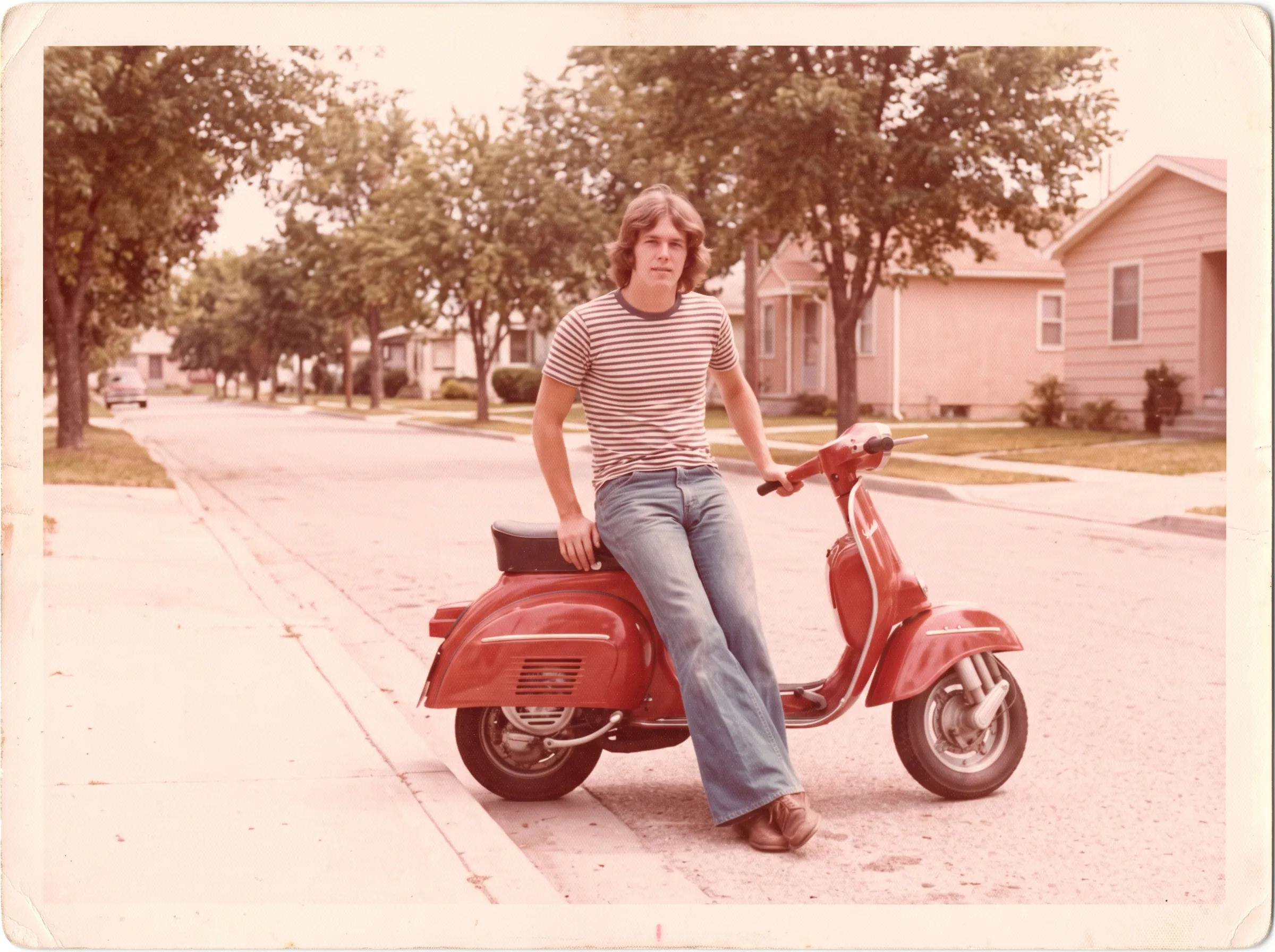 Before
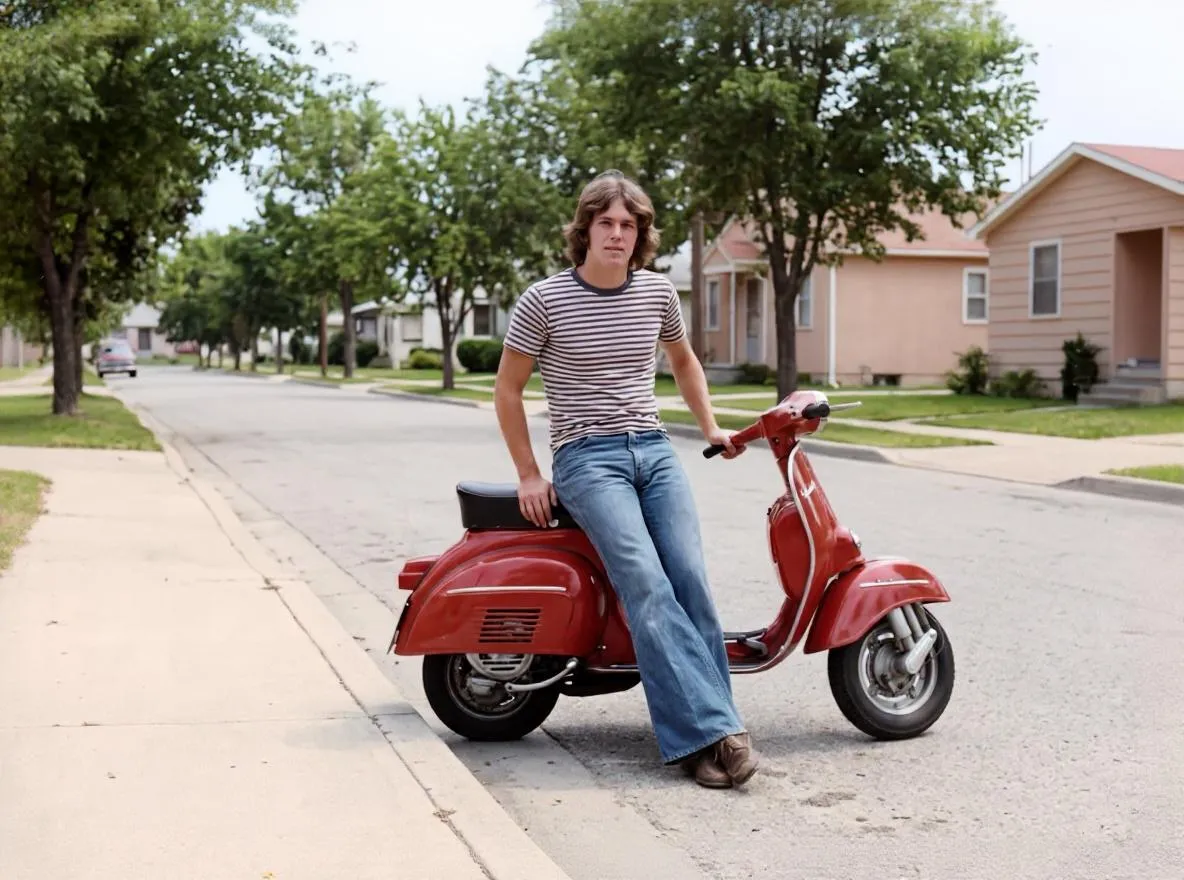 After
AfterRestoration
How to Restore Faded Photos and Fix Color Casts
Why old photos fade and turn red, yellow or pale, and how to bring back contrast and natural color with AI restoration and color correction.
Basics
How to Preserve Old Family Photos: A Practical Guide
Learn how to preserve old family photos with safe storage, careful handling, digital copies and light restoration. Know when to call a conservator.
Scanning technique
How to Scan Old Photos with Your Phone Without Glare
Lighting tricks, angle secrets and lens cleaning practices for getting flatbed scanner quality from your smartphone.